
Why Go Local?
Bringing Generative Art out of the Cloud, and in to the Home

When thinking about generative art, the first name in most people’s minds is Midjourney. This is to be expected, Midjourney produces amazing images and has been working to expand its options and abilities, as well as its excellently trained model.
The majority of people who have direct experience with generative art have experienced it in this manner; if not directly with Midjourney than with one of the other cloud-based generative art solutions: Dall-E, Imagen, Leonardo and many others.
Unfortunately these experiences, fun though they are, have led to one of generative art’s most pernicious myths: AI Art is just prompting.
Don’t get me wrong, prompting isn’t the simple matter some detractors have made it out to be. I’ve written a whole article on it so far and barely scratched the surface. The real truth though is that there is so much more to generative art than what can be seen on the surface, so much more fun, creativity and possibilities. The cloud providers are slowly adding additional features as time goes on (such as Midjourney’s remix options), but by and large the most interesting things can only be done if you’re willing to dive in deeper.
Are you ready to take the leap with me?
Before we begin, a reminder that The High-Tech Creative is an independent arts and technology journalism and research venture entirely supported by readers like you. The most important assistance you can provide is to recommend us to your friends and help spread the word. If you enjoy our work however and wish to support it continuing (and expanding) more directly, please click through below.
Why not Midjourney/Dall-E/Imagen?
Lets take a closer look at what is offered by the standard cloud products, what isn’t, and what the trade-off’s really are.
The big companies really have worked hard to put together their products and for a lot of people, this is all that will ever be needed. If all you really want to do is type in a prompt and get an image, maybe play around with wording to see how you can adjust things, all you really need is Midjourney. It’s a lot less effort.
This is the trade-off between local and cloud in this sense. Midjourney, Dall-E and the other image generation services are aiming to serve the widest market they can. This means their systems need to be rock solid, capable of good generations with a minimal of fuss and easy to use - and in general they are all those things.
In order to be all of those things for all of those people things need to be optimised, simplified. It needs to be plug-and-play. As so it is.
Convenience versus control is the trade off here.
It’s this:
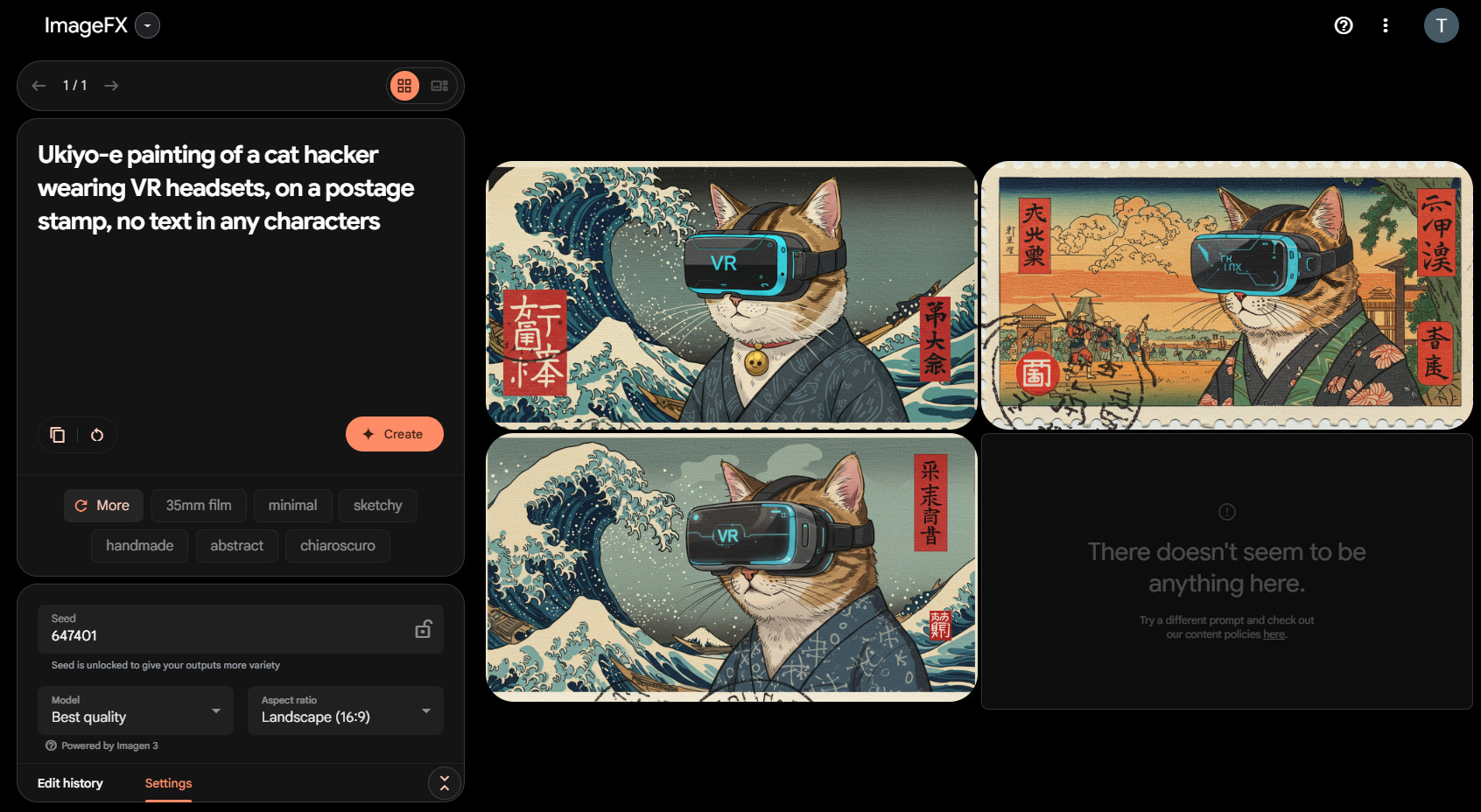
Versus this:
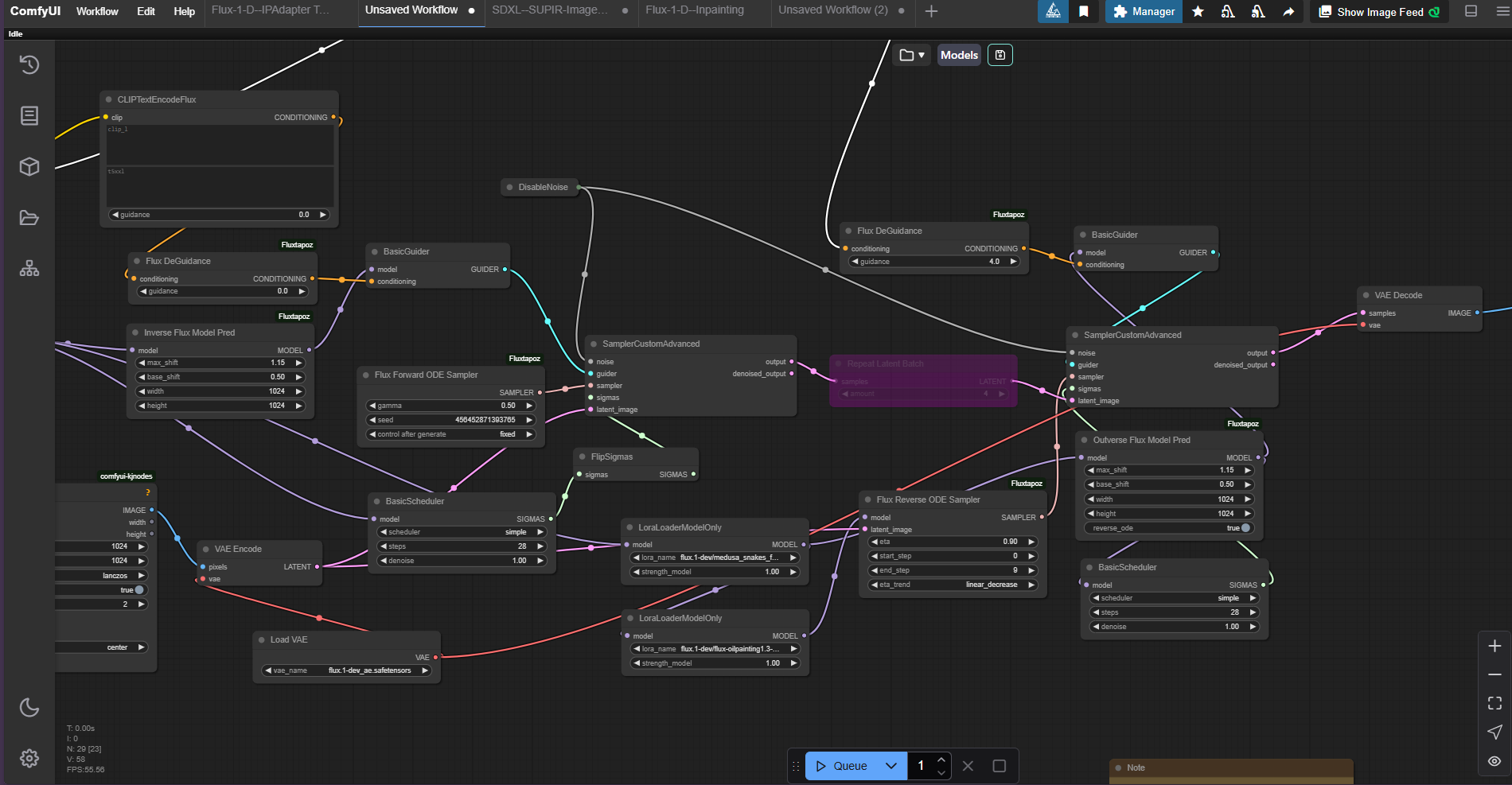
Frightened yet? This is ComfyUI, the leading local generative art (and more) application for local diffusion models. It’s a portion of a workflow implementing the RF Inversion technique discussed in [Rout], things start out a lot simpler, I assure you.
It does underline the question; why do we go to all the trouble? Lets break down the pros and cons of cloud versus local generation.
Note: For completeness, it’s worth mentioning that it is possible to run ComfyUI through hosted services “in the cloud”. I’m not familiar with these services, being a active proponent of open AI run locally, but the option does exist.
The Comparisons
Lets run through a few different generative art tasks and situations and compare the two options for each.
Cost
How much it costs to perform a task is always a concern.
Cloud: Depending on what you need this ranges from free to expensive. Generally services such as Midjourney charge a recurring monthly fee in exchange for a limited number of hours worth of GPU time. Some others charge for “image generation credits.” Some, such as Imagen, offer free generations, or at least limited free use.
Local: Local use costs only the cost of hardware and electricity, which is to say if you have a computer capable of running the models, you’re set. This isn’t cheap if your starting from scratch, but if you’re a gamer you may already have what you need.
Data Privacy
Can other people see what you’re doing? Are your experiments open to public viewing?
Cloud: It’s always safest to assume that everything you type and everything you experiment with on a cloud service is likely recorded somewhere and subject to review by administrators. Additionally some services retain all generated images for potential user in further model fine-tuning, or require all generated images to be made public on their site (Midjourney).
Local: It’s your machine, your data and your choice. Everything from the prompts and workflows you use to the images you generate and edit are kept locally for you to share, or not, as you prefer.
Text to Image (Prompting)
The first generative art task everyone thinks of, converting a text prompt into a finished image.
Cloud: All cloud services are capable of this (it’s the point, after all), with varying degrees of success. Most of the bigger services, such as Dall-E and Midjourney, have their own proprietary models for image generation which are not available for use any other way.
Local: Arguably just as capable or better as the proprietary model, the open generative art provides a wide range of model and setting options, providing a far more in-depth capability when it comes to fine tuning responses to prompts.
Inpainting
A process involving selecting a portion of an existing image and prompting an AI model to make a change in that location. The model then selectively repaints that area. Useful for adding or altering details.
Cloud: Some services, such as Midjourney’s “vary region”, have started to offer partial edits with limited control.
Local: Precise mark control, custom workflows and models designed to support the process.
Outpainting
A process involving extending an image outwards and using generative AI to fill in the new areas now revealed. Useful for altering the aspect ratio of an image.
Cloud: Some services such as Dall-E now support a limited form of outpainting.
Local: Custom workflows allow for fine-tuned outpainting, tiling and seamless blending.
Reference Based Generation
Using a reference image to guide composition or styling (or both) of the prompted image.
Cloud: Generally not available or limited to presets.
Local: IPAdapter implementations allow using reference images to guide both style and composition.
Controlnets
Using a variety of algorithms, such as edge-detection or depth-map generation, to take detail from an existing image and use it to guide the generation of a new one.
Cloud: No direct equivalent
Local: Precise composition control using custom sketches, depth and pose maps, reference images etc.
Layered Composition
Working on an image in multiple passes, to allow for edits (both small and dramatic) and reprocessing.
Cloud: Generally only single-pass generations are supported.
Local: Custom node-based workflows allow for stacking effects, refinements, multiple passes and many other options.
Model Selection
How many and which models can be used to generate images.
Cloud: Generally each service provider offers its own custom proprietary model (or several versions of same). Some providers offer a few different options and some repackage open-weight models that can be run locally into cloud services they run for a subscription fee.
Local: From the open model community there are a selection of highly capable base models (such as the Stable Diffusion line and Flux.1), and literally thousands of fine-tuned variations of those base models, some of which have been trained on millions of additional images. If you include runtime customisations, such as Loras, the number is easily in the tens of thousands. Of course, it’s always possible to make your own fine-tunes as well.
It’s about Control
You may have noticed, browsing through the list, that the big ticket for local versus cloud generative art is control. More fine-grained control over parameters, over what you do, over how you do it.
This is a two-edged sword. On the one hand, you have far more options to make use of in order to determine how your image is generated. On the other, you have to make use of those options and can’t rely on the system to do it for you. (Although there are always defaults).
Why do we want control? There are a number of reasons:
Necessity: Sometimes we want, or need if for a commission, something extremely specific that is difficult to create with just a prompt. A.I. models, like people, are fallible and sometimes incredibly stubborn.
Complexity: Prompting can be simple or complicated. Even an older stable diffusion model can give you a basic image involving a simple subject and some framing (A cat in the sunlight, a waterfall at daybreak), but the more complex compositions can be difficult, or even impossible to achieve with prompting alone.
Fun: More toys to play with, more effects to try out and use, is just plain more fun.
Experimentation and research: The cloud services need to be cautious about changes to ensure they don’t break things and endanger their revenue, and the only features available are those they provide directly. In the local system anyone with the skills is free to develop and distribute their own workflows and workflow nodes. It is not uncommon to see reference implementations of recent papers converted fairly quickly into compatible modules and available for testing fairly quickly. (The RF Inversion workflow earlier was an example of this.)
It’s about Choice
It was no exaggeration to describe the possible model choices as in the tens of thousands in the open community. There are models that have been finetuned for any number of purposes, small and large. Some of these are large training projects - Models that excel at generating anime and comic imagery or models that aim to raise realistic photography style images to new heights. There are stylistic tunings, such as models designed specifically to replicate the beautiful texture of an impasto oil painting. There are more narrow and niche tunings as well, such as a customisation to generate images that have the look and feel of a film still from an early technicolour movie, or one looking to de-professionalise photographic imagery to make images look less glossy and more like insta-snaps taken by amateur photographers.
And yes, there is generative pornography. Which brings the next point:
It’s about Freedom
Art pushes boundaries. Art is about expression. On the cloud services however, art is, and must be, heavily restricted in subject and topic. In the current climate, morally and politically, companies cannot afford to provide services that might be used to break the law, or that might offend a large portion of their userbase - or that might threaten the safety of underage users. For this reason, censorship is baked into all cloud based generative systems - as it should be.
We are not children however and these restrictions can chafe. Every time an online service, such as imagen, shows a black box telling me that a generation has been restricted for violating content rules I always yearn to see what it was that tripped the filter - even more so as I only use the most family friendly of prompts in online systems. I would dearly love to know how a “waterfall as the sun sets” managed to trip a content alarm - what exactly was that model up to!
Regardless of your taste or reason, for Art freedom can be a requirement, and for freedom you need to run local.
Artistic Vision
The biggest reason to use a local generative art model is because you are an artist. Just as you might use canvases, paints and chisels, you use generative AI. Midjourney, Imagen, these are tools that can serve you well but just as some artists cannot achieve what they want to achieve without mixing their own paints or creating their own strange sculpting tool, so too is there far more chance to achieve your creative vision if you have the opportunity and the ability to create your own generative workflows.
We will have examples of this in the next few articles as I have been working on several art projects over this month for the High-Tech Creative. Join us soon for a behind-the-scenes peek at how you can turn a rough sketch into a finished work of art with generative AI, and why you might want to, and how you can go about creating a series of artworks in a unified style.
Where to next?
I want to say thankyou to everyone who has subscribed and joined us on this journey so far, and this article is part of that. Hopefully now I’ve whet your curiousity about what you can achieve if you step deeper into the generative art rabbit-hole. To show my appreciation for everyone who has welcomed me here, if you’re looking to take that next step into local AI, I want to help you.
I’m working on a tutorial at the moment, the first of a series, and I will be releasing it for free here for all subscribers. This tutorial will take you step by step through setting up local generative art AI models to run on your own equipment, and guide you through your first workflow. We’ll cover the hardware you need to get started, the software and models to begin with, and how to put it all together.
Generative AI should be for everyone.
About Us
The High-Tech Creative
Your guide to AI's creative revolution and enduring artistic traditions
Publisher & Editor-in-chief: Nick Bronson
Fashion Correspondent: Trixie Bronson
AI Contributing Editor and Poetess-in-residence: Amy
If you have enjoyed our work here at The High-Tech Creative and have found it useful, please consider supporting us by sharing our publication with your friends, or click below to donate and become one of the patrons keeping us going.